HP Enterprise printers - Print option is missing on the Information tab in the Embedded Web Server - HP LaserJet M506dn
HP Enterprise printers - Print option is missing on the Information tab in the Embedded Web Server - HP LaserJet M506dn
Issue
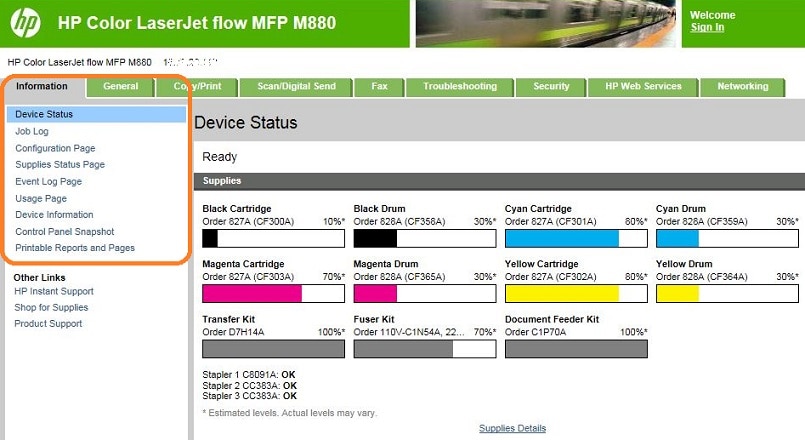
When trying to print to an HP Enterprise model from the printer’s
Embedded Web Server, the Print option is not available in the
left navigation pane on the Information tab.
Figure : Information tab, Print option disabled
Solution
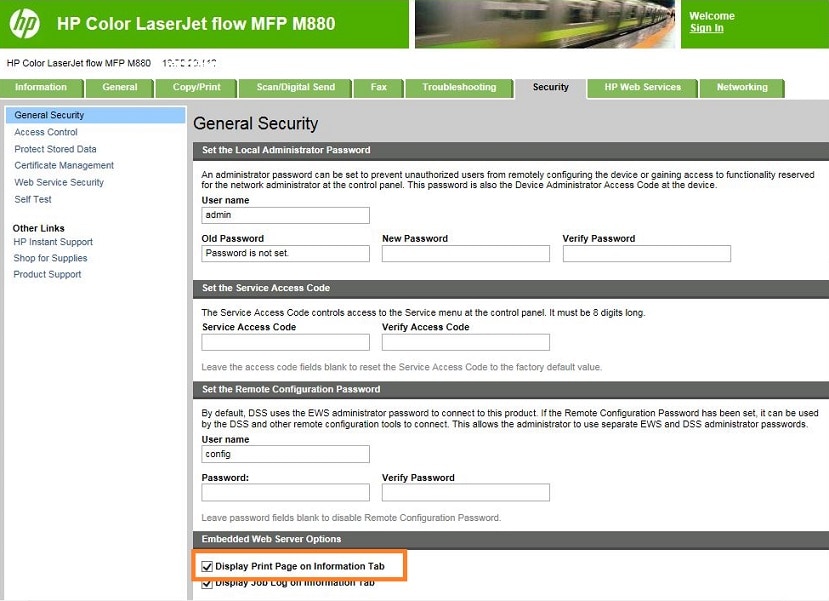
Enable the Print option on the Security tab.
-
Click the Security tab.
NOTE:
You might need administrator credentials to log in to access this tab. -
Select Display Print Page on Information Tab.Figure : Security tab, Embedded Web Server options, Display Print Page on Information Tab selected
-
Scroll to the bottom of the page and click Apply.
-
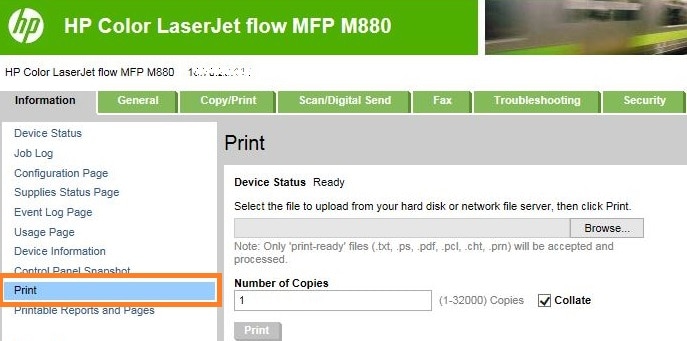
Click the Information tab. The Print option is available in the left navigation pane.Figure : Information tab, Print option available
Affected printers
HP LaserJet Enterprise, HP Officejet Enterprise, and HP PageWide
Enterprise models.
https://support.hp.com/
Comments
Post a Comment