HP LaserJet Enterprise M506, M507, HP LaserJet Managed E50145 - Install memory DIMMs
HP LaserJet Enterprise M506, M507, HP LaserJet Managed E50145 - Install memory DIMMs
Install memory DIMMs
This document provides the procedure to install the optional memory DIMM.
CAUTION:Electrostatic sensitive (ESD) parts. Always touch the sheet metal on the product to provide a static ground before touching an ESD-sensitive part.
-
Remove the memory DIMM box. Verify that the contents of the box match this illustration.Figure : Memory DIMM

-
Turn off the printer, disconnect the power cable from the outlet, and then disconnect any USB or network cables.
-
Slide the formatter cover toward the rear of the printer to remove it.Figure : Remove the formatter cover

-
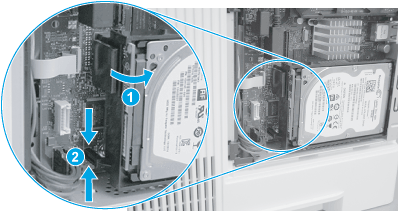
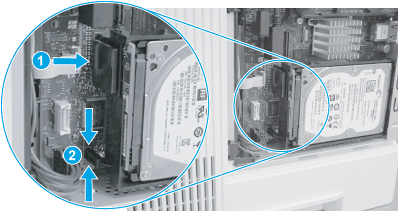
For printers with the optional hard-disk drive (HDD) installed: Remove the HDD by releasing the locking connector (callout 1), and then pinching the retainer (callout 2) to release it.Figure : Release the HDD
-
For printers with the optional hard-disk drive installed: Rotate the connector end of the HDD out and away from the formatter (callout 1), and then slide it as shown (callout 2) to remove it.Figure : Remove the HDD

-
Remove the DIMM from the packaging.Figure : Remove the DIMM from the packaging

-
Align the connector on the DIMM with the connector on the formatter (callout 1), and then push the DIMM onto the formatter to install it (callout 2). Make sure that the DIMM is fully seated in the connector.
NOTE:
The DIMM can only be installed in one direction on the formatter.Figure : Install the DIMM
-
For printers with the optional hard-disk drive (HDD) installed: Before proceeding, take note of the location of the slot (callout 1) in the sheet-metal where the HDD cradle mounting tab (callout 2) must be installed.
CAUTION:
This portion of the sheet-metal is a knock-out plate (callout 1). Do not push on it with sufficient force to detach it when installing the HDD.Figure : Locate the slot in the sheet-metal
-
For printers with the optional hard-disk drive installed: Insert the HDD cradle mounting tab in the slot in the sheet-metal (callout 1), and then rotate the connector end (callout 2) of the HDD toward the formatter.Figure : Install the HDD

-
For printers with the optional hard-disk drive installed: Make sure that the locking connector (callout 1) latches and that the standoff (callout 2) engages with the slot in the formatter (it might be necessary to pinch the retainer to engage it with the slot).Figure : Install the HDD
-
Slide the formatter cover toward the printer to replace it.Figure : Replace the formatter cover

https://support.hp.com/
Comments
Post a Comment